Categorías
Blog post

Your Lifecycle Stages Aren’t the Problem. Your Exit Criteria Are.

CRM · RevOps

Every stalled CRM implementation I have been called into had a lifecycle stage model. Usually a good one. Subscriber, Lead, MQL, SQL, Opportunity, Customer — the same six words, sitting in the same dropdown, in HubSpot or Salesforce or whatever else.

The stages were never the problem. What was missing, every single time, was the boring part underneath: who decides a contact has left this stage, on what evidence, and what happens the moment they do. Without that, a lifecycle stage is a label someone types in when they remember. Reporting built on it is fiction, and everybody in the room quietly knows it.

This is the model I actually implement, and the four questions I make a team answer per stage before we touch a single property in the CRM.

Lifecycle stage and lead status answer different questions

Start here, because conflating these two fields causes more damage than any other CRM mistake I see, and it is completely free to fix.

Lifecycle stage answers: how far into the relationship is this person? It moves forward, it is owned by the business as a whole, and it is what you report the funnel on. Lead status answers: what is happening in the work right now? New, attempting contact, connected, unresponsive, unqualified. It bounces around, it is owned by whoever is working the record, and it is what a rep looks at on Monday morning.

When teams collapse the two, you get lifecycle stages like «Attempting to contact» and «Nurture» sitting in the same dropdown as MQL and Customer. The funnel report then counts a stalled call attempt as a funnel position, conversion rates between stages become uninterpretable, and nobody can answer the only question the model exists to answer: of the people who reached this point, how many reached the next one, and how long did it take?

The tell: if your lifecycle dropdown has more than seven options, or if any of them is a verb, you have work statuses living in a funnel field. Split them before you do anything else on this list.

Every stage needs four things, and most have one

Most implementations define what a stage means and stop there. A stage is only operational when all four of these exist in writing:

What it needs The question it answers
A definition What is true about a person who is here? Written so two people in different teams classify the same record identically.
An exit criterion What specific, observable event moves them out? Not «shows interest» — a form, a threshold, a meeting held, a stage change on a deal.
An owner Who is accountable while the record sits here, and who is accountable for the transition itself? Those can be two different people.
A timestamp A date property written when the record enters. Without it you cannot measure stage velocity, and velocity is where the actual diagnosis lives.

The exit criterion is the one that does the work. «MQL means a marketing-qualified lead» is a tautology. «MQL means fit score is 60 or above and the contact has either requested a demo or hit 3 pricing-page views in 14 days» is a rule a workflow can execute and a sales director can argue with — which is exactly what you want, because the argument happens once, in a room, instead of every week in the pipeline review.

The timestamp is the one everybody skips and later wishes they had. Entry dates per stage are what let you say «MQL to SQL takes 19 days and 40% never make it» instead of «the funnel feels slow». They cost nothing to add on day one and cannot be reconstructed retroactively.

Fit and intent are two scores, not one

The single most common scoring failure: one number, built by adding points for job title to points for email opens. A CFO at a perfect-fit company who has visited twice scores the same as a student who downloaded four PDFs. The model cannot tell you which one to call, because the two inputs mean opposite things.

Fit is who they are — industry, size, role, geography, tech stack. It is slow-moving and mostly firmographic. Intent is what they are doing — pricing page, demo request, repeat sessions, reply to a sequence. It is fast-moving and it decays. Keep them as two properties and the routing logic writes itself:

High fit · high intentSales, now. This is the only quadrant that should trigger an SLA.
High fit · low intentMarketing nurture, and the highest-value list you own. Do not let sales burn it with cold sequences.
Low fit · high intentSelf-serve, community, or politely nothing. The quadrant that quietly consumes the most rep hours.
Low fit · low intentDatabase. Measure it, do not work it.

Two more rules that save scoring models from themselves. Intent must decay — a pricing visit from March should not still be inflating a score in September, and a model without decay slowly promotes your entire database. And negative scoring should be structural, not behavioural: subtract for a competitor domain, a student email, a country you do not sell into. Subtracting points because someone did not open an email punishes the email, not the lead.

The key idea: a lifecycle model is not a taxonomy, it is a set of agreements about who acts when. If a stage has no exit criterion and no owner, it is not a stage — it is a folder.
A test you can run this afternoon: ask your head of sales and your head of marketing, separately, to write down what makes a lead an MQL. If the two answers differ — and they almost always do — you have found the reason your funnel report is not trusted. That gap is the whole project. Talk it through with me if you want a second pair of eyes on it.

Three rules that keep the model clean once it is live

1. Lifecycle only moves forward. A customer who fills in a top-of-funnel form does not become a Lead again. Most CRMs will happily let a workflow demote them, and once that starts your customer count drifts down every month for reasons nobody can trace. Guard every stage-setting workflow with a condition that checks the current stage first. Movement backwards, when it is genuinely needed, is a deliberate manual act with a reason logged — not an automation side effect.

2. One owner per transition. Two workflows that can both set a contact to MQL will eventually fight, and the winner is decided by execution order rather than intent. Every transition gets exactly one mechanism: one workflow, or one manual action, never both. Write the list of transitions down; if a transition has two possible causes, one of them is a bug you have not hit yet.

3. Recycling is a defined path, not a graveyard. Roughly two-thirds of leads sales rejects are still viable later, and the default handling — mark unqualified, forget forever — is where most B2B pipeline quietly dies. Define the return route: rejection reason is mandatory, timing rejections go back to nurture with a re-entry rule, fit rejections are suppressed permanently. A rejection reason field that is optional will be empty within a month, and then you have no idea whether your leads are bad or your timing is.

The five-day pass I would run on your CRM

This is not a quarter-long project. On a normal mid-market setup it is a week, and most of the week is conversation rather than configuration.

Day 1 — Audit. Export contacts by lifecycle stage. Count how many sit in each, how long they have been there, and how many were last touched by a human. The distribution alone tells you which stages are real and which are storage. Day 2 — Definitions. Both teams in one room, one page per stage, four boxes each: definition, exit criterion, owner, timestamp. Nobody leaves until the MQL row is agreed. Day 3 — Split the scores. Fit and intent as separate properties, decay on intent, structural negatives only.

Day 4 — Build and guard. One workflow per transition, forward-only conditions, entry-date stamps on every stage, mandatory rejection reason. Day 5 — The report you could not build before. Volume, conversion rate and median days per stage, plus recycled-lead outcomes. That report is the deliverable. The configuration was just what made it possible.

One dependency worth naming: none of this survives dirty data. Duplicate contacts split a person’s history across two records and both of them score wrong — which is why the hygiene layer comes first, and why we ended up building a deduplication bot on top of the HubSpot API rather than trusting native tooling alone. Fix the records, then fix the model.

Questions that come up every time

What is the difference between lifecycle stage and lead status?

Lifecycle stage records how far a contact has progressed in the overall relationship and moves forward only — it is what funnel reporting is built on. Lead status records what is happening in the work right now (new, attempting, connected, unresponsive) and changes freely. Keep them in separate properties: mixing them makes conversion rates meaningless.

How many lifecycle stages should a B2B company have?

Five to seven. Fewer and the funnel hides its own bottlenecks; more and the extra stages are almost always work statuses or segments wearing a costume. Add a stage only when a different team owns the record after the transition.

Should lifecycle stages ever move backwards?

Not automatically. Guard every stage-setting workflow so it cannot demote a record. When a genuine reset is needed — a churned customer re-entering evaluation, for example — make it a deliberate manual action with a logged reason, so the funnel history stays interpretable.

Do we still need lead scoring if we have AI in the CRM?

Yes, and arguably more. A predictive or AI-assisted score is only as good as the definitions and outcomes it learns from — if your MQL label is applied inconsistently, the model learns the inconsistency. Get the human-legible model right first, then let automation run on top of it.

The model is an agreement, and agreements need maintenance

The reason lifecycle models decay is not technical. They decay because the agreement behind them was made once, by people who have since changed roles, about a product that has since changed shape. The definitions stay in the CRM long after they stopped describing the business.

So put a date on it. Once a quarter, take the four-box page for each stage and ask whether the exit criteria still match how deals actually happen. It is a forty-minute meeting and it is the difference between a CRM that reflects the business and one that reflects the business as it was two years ago.

And before you hand any of this to automation, make sure the rules exist in writing first — the same argument applies to giving an AI write access to your CRM. Automation is very good at executing a model consistently. It is very bad at noticing that the model was never agreed.

Want this run on your CRM?

I rebuild lifecycle and scoring models for B2B teams on HubSpot: stage audit, definitions workshop with sales and marketing in the room, split fit/intent scoring, guarded workflows, and the funnel report at the end of it. A week of work, and you keep the documentation.

Book a lifecycle audit

Nacho Hernandez

Nacho HernandezMarketing & Business Consultant · Studio IdeagoLinkedIn →
Categorías
Blog post

The EU AI Act’s Transparency Rules Are Live: What Marketing Teams Have to Change

Compliance · Marketing Ops

For three years the EU AI Act was a thing your legal team would deal with later. Later arrived on 2 August 2026.

That is the date Article 50 — the transparency chapter — started to apply, and the date the Commission’s AI Office and national market surveillance authorities began enforcing it. In plain terms: chatbots have to tell people they are chatbots, AI-generated or manipulated content has to carry machine-readable marks, and deepfakes have to be labelled. Breaches of these obligations sit in the penalty band that reaches EUR 15 million or 3% of worldwide annual turnover.

Almost everything written about this has been written by law firms, for law firms. This is the operator’s version: which of your assets are actually in scope, who carries the obligation, and what to change in your stack this month.

What actually changed on 2 August 2026?

Article 50 covers four situations, and it is worth reading them as four different products rather than one rule: AI systems that interact directly with people, AI systems that generate synthetic audio, image, video or text, emotion recognition and biometric categorisation, and deepfakes plus AI-generated text published to inform the public on matters of public interest.

The mental model that helps most: this is not a consent regime, it is a disclosure regime. GDPR asks whether you are allowed to process someone’s data. Article 50 asks whether the person understands what they are looking at. You can keep using every AI tool you use today. You cannot keep being ambiguous about it.

The timing detail people miss: the disclosure has to reach the person at the latest at the time of the first interaction or exposure, in a clear and distinguishable manner, and it has to meet accessibility requirements. A note in your terms of service is not a disclosure. A grey 10px line under the chat window that a screen reader skips is not one either.

The compliance shortcut: the Commission published its Article 50 guidelines on 29 July 2026 alongside a Code of Practice on Transparency of AI-generated Content, and more than 180 organisations signed at launch. Adhering to that code is the recognised way to demonstrate compliance with the marking and labelling duties. Providers and deployers who choose not to sign have to demonstrate compliance through alternative, equivalently adequate means — which is a polite way of saying you will have to invent and defend your own method.

Are you the provider or the deployer?

This single distinction decides how much work you have. A provider develops an AI system and places it on the market under its own name. A deployer uses one under its own authority in a professional capacity. If you run marketing on HubSpot, Meta and an off-the-shelf chatbot, you are a deployer of all three.

The obligations split accordingly. Informing people that they are talking to an AI, and marking generated content in a machine-readable format, are drafted at the provider — your vendors. Disclosing emotion recognition and biometric categorisation, and disclosing deepfakes, are drafted at the deployer — you.

Which sounds like most of it is someone else’s problem. It is not, for two reasons. First, the provider ships the capability but you configure the surface: if you rename the assistant, replace the vendor’s default disclosure with your own copy, or design a widget where the notice is invisible on mobile, the ambiguity is yours. Second, the exemption everyone reaches for — disclosure is not required where the AI is obvious — is measured from the point of view of a reasonably well-informed, observant and circumspect person, in context. An assistant with a human first name, a headshot and a typing indicator is engineered to defeat exactly that test.

The four places marketing teams actually get caught

1. The website and WhatsApp chatbot

The most common failure is not a missing disclosure — it is a disclosure that was there and got designed away. Check the vendor default is still on, that it appears in the first message rather than in a collapsed panel, and that it survives on mobile. If your bot hands off to a human, say when that happens too. The person’s understanding is the thing being regulated, not the checkbox in the admin panel.

2. AI ad creative that looks real

A deepfake, in the Act’s definition, is AI-generated or manipulated image, audio or video content that resembles existing persons, objects, places, entities or events and would falsely appear authentic. Read that again with your last creative batch in mind. A photoreal AI product shot staged in a place that looks like a real place, an AI-generated spokesperson, a synthetic customer testimonial: all candidates. Native generation inside ad platforms made this a volume problem rather than an occasional one — we covered that shift when Meta put its own image model inside the ad tools. Platform auto-labelling helps, but the disclosure duty for deployers is yours, and platform labels are not a defence you control.

3. AI-written content — read the carve-out before you panic

This is where most teams over-comply. The deployer duty on AI-generated text applies to text published to inform the public on matters of public interest, and it does not apply where the content has undergone human review or editorial control and a natural or legal person holds editorial responsibility for the publication. Separately, the marking obligation does not apply where the system performs an assistive function for standard editing or does not substantially alter the input. Your product page is not a matter of public interest, and a drafted-then-edited article with a named accountable author is exactly the case the carve-out describes. The fix here is editorial governance, not a banner on every post.

4. Emotion and biometric tooling

If you run emotion inference on faces or voices — video ad testing panels, sentiment scoring on recorded sales calls from the audio itself — you are a deployer of an emotion recognition system, you must inform the people exposed to it, and you process that data under GDPR. Worth being precise, because most people over-apply this one: sentiment analysis on the text of support tickets is not biometric, and it is not what this paragraph covers.

The key idea: Article 50 does not ask you to use less AI. It asks you to stop being ambiguous about it. The teams that will struggle are not the heavy AI users — they are the teams that cannot produce a list of where AI touches a customer.
A five-minute test: name every customer-facing surface where AI speaks, writes or generates. Bot, SDR sequences, ad creative, on-site personalisation, review replies. If that list does not exist in writing, building it is the work. The legal review is the easy part afterwards.

A 30-day compliance pass for your marketing stack

Not a legal project. A week of inventory, a week of copy and configuration, and a standing owner. Here is the pass I would run on any client stack.

Surface What to do this month
Chatbots and AI assistants Disclosure in the first message, visible on mobile, readable by a screen reader. Say when a human takes over.
AI voice and outbound Disclose at the opening of the call or message, not after qualification. Store the exact wording used.
Paid social and display creative Tag every synthetic asset at production time. Keep platform AI labelling switched on. Disclose photoreal generations of people or places.
Content and SEO Named author with editorial responsibility, documented review step. That is the carve-out — make it real rather than assumed.
Research and call analytics Any emotion or biometric inference: notify participants, confirm the GDPR basis, and ask whether you need the feature at all.
Vendors Two questions per vendor: are you a signatory to the Code of Practice, and do your outputs carry machine-readable marks?
The register One sheet: system, vendor, your role, disclosure wording, owner, last reviewed. This is the artefact clients and auditors ask for.

That last row is the one worth doing even if nothing else gets done. The register is what turns a vague anxiety into a five-minute answer, and it is the same inventory the AI literacy obligations have been quietly asking organisations to produce since early 2025. It also happens to be the document that makes the governance conversation possible internally — the same reason we argued for writing rules down before switching on AI write access to a CRM.

Questions people keep asking

Does this apply if my company is not based in the EU?

The Act reaches systems and outputs used in the Union, not only companies established in it. If you run campaigns, chatbots or generated creative aimed at people in the EU, the working assumption should be yes — and the specific analysis belongs with your counsel.

Do I have to label every blog post I drafted with AI?

No. The deployer duty on text is limited to publications informing the public on matters of public interest, and it falls away where there was human review or editorial control with someone holding editorial responsibility. Assistive editing that does not substantially alter the input is outside the marking obligation as well.

Who enforces this, and what is the exposure?

National market surveillance authorities, the AI Office for systems under its supervision, and the European Data Protection Supervisor where EU institutions are involved. Breaches of the transparency obligations sit in the band reaching EUR 15 million or 3% of worldwide annual turnover.

Disclosure is a trust asset, not a tax

The instinct in most marketing teams is that saying this is AI costs conversion. In practice the opposite has been true wherever it has been tested properly: people disengage when they suspect they are being handled by a machine that is pretending otherwise, not when they are told plainly and then given a fast, useful answer. The disclosure is not the friction. The discovery is.

Which is the practical case for treating this as an operations project rather than a legal one. The inventory, the wording, the ownership, the review cadence — these are the same habits that make an AI-heavy marketing function reviewable at all. The regulation just set a date on them.

One caveat, stated plainly: this is an operator’s reading of the rules, not legal advice. The classification of a specific system, and anything close to the line, is a conversation for your counsel — go into it with your register in hand and it will take an hour instead of a month.

Want the register built for you?

I run AI disclosure audits for marketing teams: full inventory of AI touchpoints across web, ads, CRM and content, provider-versus-deployer mapping, disclosure copy that does not kill conversion, and an owner and review cadence you can actually keep. Typically a week of work.

Book an AI disclosure audit

Nacho Hernandez

Nacho HernandezMarketing & Business Consultant · Studio IdeagoLinkedIn →
Categorías
Blog post

How to Implement AI Tools to Optimize Business Operations

Welcome to Ideago Blog

Artificial Intelligence (AI) is no longer a technology reserved for large corporations with million-dollar budgets. Today, any business, regardless of size, can integrate AI tools into daily operations to improve efficiency, reduce costs, and enhance decision-making.

In this article, we explore some of the most accessible AI tools that can transform business management, along with real-world examples of how companies have optimized their processes with minimal changes.

share this on your social channels!

Key Benefits of AI in Business

Before diving into specific tools, let’s highlight the concrete benefits AI can bring:

  • Time Savings: Automates repetitive tasks so employees can focus on strategic activities.

  • Better Customer Service: Provides fast and personalized responses.

  • Real-Time Data Analysis: Enables informed decision-making based on data.

  • Cost Reduction: Minimizes human errors and optimizes resources.

And yes, implementing new tools in our business can be tedious at times. They take time to learn, incorporate, or even change ways of working that people have been doing for many years. But without belaboring the point, let’s jump straight to real-life cases and how they use AI to give you some inspiration.

AI Tools for Business Applications

These tools are readily available and can be easily integrated into the daily operations of any company:

1. AI Chatbots – Enhancing Customer Service

Tools: ChatGPT, Drift, Intercom
Many businesses spend considerable time answering frequently asked customer questions. AI-powered chatbots can automate responses without compromising quality.

Case Study: A small fashion store implemented a chatbot on its website using Intercom to handle inquiries about shipping, sizing, and product availability. Result: A 40% reduction in customer support workload and a 20% increase in conversions.

2. Automated Email Marketing

Tools: HubSpot, Mailchimp AI, ActiveCampaign
Businesses can personalize and automate email marketing campaigns to improve customer engagement.

Case Study: A marketing agency started using AI-powered HubSpot to personalize emails based on customer behavior. Result: A 35% increase in email open rates and 25% more conversions.

3. Reducing Time Spent in Meetings

Tools: Fireflies.ai, Otter.ai
Meetings can be lengthy and inefficient. AI-powered transcription and summarization tools improve productivity.

Case Study: A law firm adopted Fireflies.ai to record and summarize client meetings. Result: A 50% reduction in time spent taking notes and improved information organization.

4. Sentiment Analysis on Social Media

Tools: MonkeyLearn, Brandwatch, Hootsuite Insights
Monitoring brand perception on social media is crucial for adjusting marketing strategies.

Case Study: A healthy food startup used MonkeyLearn to analyze customer feedback on social media. Result: Quick identification of packaging complaints, leading to design improvements and increased customer satisfaction.

5. Optimizing Hiring Processes

Tools: HireVue, Pymetrics
Recruiting candidates becomes more efficient with AI, which analyzes skills and compatibility.

Case Study: A tech company implemented HireVue to assess body language and voice tone in interviews.
Result: A 30% reduction in hiring time and better talent selection.

6. AI-Powered Content Generation for Blogs & Social Media

Tools: Jasper, Copy.ai, Writesonic
Content creation can be accelerated with AI-powered writing tools.

Case Study: A travel agency used Jasper to generate destination descriptions and promotional content for social media. Result: A 60% reduction in content creation time and increased engagement.

Conclusion: AI is an Opportunity, Not a Threat

Implementing AI tools does not require million-dollar investments or specialized teams. With small adjustments in daily processes, any company can benefit from AI’s potential.

If you want to explore how artificial intelligence can optimize your business, our agency can guide you in choosing the right tools and ensuring effective integration. Contact us today and take your business to the next level!

Do you have any question for us?

We love hearing new challenges, complete the following form and we will answer you in less than 24 hours!

Categorías
Blog post

4 golden tips before you create your business

Welcome to Ideago Blog

4 golden tips before you start your own business

Are you planning to start your own business? Do you have an idea that you think could be profitable? Are you looking to become a freelancer and create your own brand?

Only In 2021, studio Ideago helped more than 20 new brands to go out into the market. This is why we thought it would be very useful to create these 4 simple golden tips to put into practice before investing time and money into a new business.

¡Attention!

These tips are for anyone to follow, you do not need any specific knowledge or previous technical skills.

share this on your social channels!

Share on facebook
Share on twitter
Share on linkedin

Let’s go for it!

Alright, now we are ready to start. We will assume that you already have a fairly clear idea of what you want to do (if not, the first thing then will be to define what you want). 

Before investing resources in your idea, we advise you to follow these 4 golden tips to analyze whether your business could work or not.

Tip 1 – Analyze the market

It may sound very complicated, but analyzing a market is something we do every day with our mobiles without realizing it.

Your business will surely be defined within an existing industry. Use search engines like Google to enter keywords related to the service or product you want to sell and analyze the results you get. For example, if you want to sell shoes in Spain, enter the keyword «sale of shoes in Spain» and check the results of at least the first two pages in Google.

Then perform the same type of search, that is, using keywords related to your business, but on your social networks (Youtube, Linkedin, Facebook, Instagram, TikTok, etc).

Very well! you have already started mapping the industry.

Now, when you carry out market analysis, one of the things you need to keep in mind is the number of results you get on Google, this will give you an idea of the dimensions of the market. If the results are very few, you know that the idea will be easy to communicate, since it does not have as much content competing for positions, but difficult to sell because there is no significant market, that is, a demand. On the contrary, if you get many results it means that there is a market for your idea, you just need to see how to differentiate yourself.

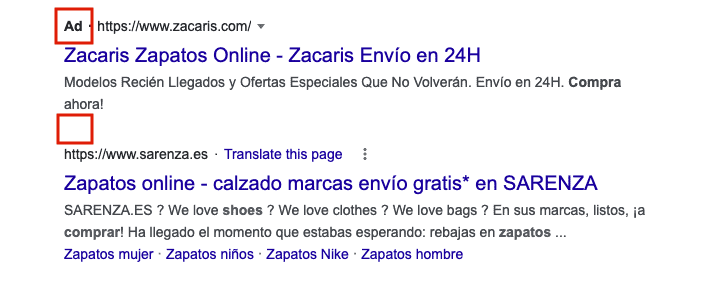
Within your analysis also check if there are any brands paying for ads in that category or industry. You can do this easily when you search on Google, the first results that have the word AD above is because they are brands that pay to be in that position. Below there is an example of how to differentiate a paid result like Google Ads, from an organic result.

Tip 2 – Analyze the competitors

When you are testing your keywords in Google you will learn about who your direct and indirect competitors will be and how many there are. Each brand that appears, each web page, will allow you to map the market in some way in your head, but t could also be very useful to write it down (Although you will do it in the next steps). You can also have an idea of which brand or competitor you want to resemble, which is a good exercise before starting a business to determine what your position will be in the market and what message will identify you.  In addition to your competitors’ websites, check their social networks, what channels they have, how they communicate, how often they publish and what type of interactions they receive from their community. Once these 2 points have been made, you will have a much solid and reasoned idea about whether you believe your business is going to work or not. Can you imagine your brand working after having made the previous points? Do you see your brand or idea competing in the market that you have been able to analyze? If you notice that your idea will not work, it is time to go back and rethink the strategy, the product and the service. If your business idea is still standing, you should continue with tip 3 and 4.

Tip 3 – Develop a business or marketing plan

Here we get into a bit of a mess, but a necessary mess. It is time to make a document that guides all our investment and our idea, this is called a business or marketing plan. Do not worry, it sounds difficult but you will see that it is something you can do without any problem.

Now that you’ve done some research on the industry, market, and competitors, and reasoned that your idea is still viable, it’s time to write your plan and strategy. We do this to create a document that can be shared and allow a group of people to align on the needs and goals of your brand.

Basically this document will be what guides the entire team on the direction of the company or brand. Make sure your plan covers at least the following points:

  • Market Analysis
  • Competitor Analysis
  • Definition of objectives
  • What position do I want in the market
  • Description of my idea or product/service.
  • What kind of communication will we do
  • What kind of channels will we embrace and with what creatives
  • We will define the budget
  • Planning in a calendar of the actions to be carried out.

But don’t worry if this is something you don’t want to do yourself. Many people hire agencies or professionals like Studio Ideago to help them with these types of documents. Hence the last tip for the well-being of your business.

Tip 4 – Look for professional advice

This is the last tip but not the least important. Whenever you have a business idea, it is highly recommended to seek advice from a marketing and business professional so they can give you their expert and external point of view, on the budget you plan to invest and on the goals you want to achieve, for example. This type of advice can give you ideas that you did not foresee, or light you up on a winding path such as creating your own business.

We hope that these simple steps will help you have a clearer vision about your idea or business and  the goals you want to achieve. Do not be discouraged, creating your own business is a difficult path with ups and downs, but if you like what you do, and surround yourself with the right people, in the end you will always succeed.

If you would like to discuss your idea with us, you can contact us here, or leave us your comment in the forms below. We’re happy to hear about your business and help you make it a profitable brand. 

About the Autor


Linkedin

Do you have any question for us?

We love hearing new challenges, complete the following form and we will answer you in less than 24 hours!

You might also be interested in the following related content