Categorías
Blog post

HubSpot AEO and Agentic AI: What the Spring 2026 Spotlight Really Means for Your Marketing

HubSpot · Agentic AI · Spring 2026

HubSpot AEO and Agentic AI: What the Spring 2026 Spotlight Really Means for Your Marketing

On April 14, HubSpot dropped its Spring 2026 Spotlight — over 100 updates, a new Answer Engine Optimization tool, and expanded AI agents. Here’s what actually matters if you’re running marketing and sales on HubSpot right now.

Every six months, HubSpot does a Spotlight release. Most of the time it’s incremental — new UI tweaks, a few workflow improvements, a feature that was already in Salesforce three years ago. Spring 2026 is different. The announcement of HubSpot AEO, the expansion of AI Agents, and the reframing of HubSpot as a context-aware platform signal a genuine strategic shift — one that has direct implications for how marketing consultants and in-house teams should be operating their portals.

This isn’t a recap of the press release. It’s a working analysis of what’s changed, what’s actually useful, and what you should do with it.

What is HubSpot AEO and why it changes the game

AEO stands for Answer Engine Optimization — optimizing how your brand appears when someone asks ChatGPT, Perplexity, Gemini, or Google AI Overviews a question related to your business. Not in the blue links. In the answer itself.

HubSpot AEO does something genuinely new: it uses your own CRM data — contacts, deals, customer language, objections — to suggest the prompts your real prospects are likely to type into AI tools. Then it shows you how well your brand surfaces in those answers, and what to fix.

Key insight: Traditional SEO optimizes for crawlers. AEO optimizes for inference. HubSpot is the first CRM to connect your customer data to AI visibility — meaning your positioning improvements are grounded in actual buyer language, not keyword guesswork.

Is it perfect? No. The tool is new and the scoring methodology isn’t fully transparent yet. But the direction is exactly right: the brands that will dominate AI-driven search over the next 24 months are the ones building structured, authoritative, entity-rich content now. HubSpot AEO gives you a dashboard to track that — and it’s available at $50/month standalone or included with Marketing Hub Pro and Enterprise.

For context: in 2026, referrals from large language models to websites have grown 800% year-over-year according to Semrush data. Your buyers are already asking AI for vendor recommendations. The question is whether you show up in those answers.

How to activate it: If you’re on Marketing Hub Pro or Enterprise, HubSpot AEO is available now under the Marketing menu. Run the brand visibility scorecard first — it takes about 10 minutes and gives you a baseline before you make any content changes.

The new AI Agents: Prospecting and Customer

HubSpot’s AI agents have been in beta for a while. The Spring 2026 update graduates them to production-ready status with meaningful new controls.

Prospecting Agent now manages the full lifecycle: it identifies buying signals (job postings, funding rounds, news mentions), builds out the buying committee at a target account, and drafts personalized outreach for rep approval. Early customers are seeing 2x industry benchmark response rates. It’s available with a 28-day free trial at $1 per recommended lead — which is actually aggressive pricing if the quality holds.

Customer Agent — HubSpot’s AI for support and service — now supports granular configuration: tone and style by channel, multi-brand deployment, working hours settings, and percentage-based rollouts so you can test it on 20% of tickets before going full scale. At $0.50 per resolution, it starts making financial sense at moderate ticket volumes.

The nuance: These agents work significantly better when your CRM data is clean and structured. If your contact properties are inconsistent, your deal stages are vague, or your knowledge base is thin — the agents will underperform. Before activating them, run a CRM hygiene audit.
2x
Response rate vs industry avg
(Prospecting Agent, early customers)

$0.50
Per AI resolution
(Customer Agent)

100+
New updates in
Spring 2026 Spotlight

Smart Deal Progression: less manual CRM, more closed deals

If there’s one feature in this release that will save real time for real sales teams, it’s Smart Deal Progression. After every call, it analyzes the transcript alongside the full deal history and does three things automatically: drafts the follow-up email, suggests CRM property updates (stage, close date, next step), and surfaces risks based on what was — or wasn’t — said in the conversation.

The key word is suggests. Reps still approve before anything goes into the CRM or gets sent. That’s the right call — it maintains data quality while removing the post-call admin burden that kills sales productivity.

In practical terms: if a rep has 8 calls a day and spends 15 minutes per call on post-call notes, Smart Deal Progression can recover 2 hours of selling time per day. That’s not a minor efficiency gain.

Prerequisite: Smart Deal Progression requires call transcription enabled (HubSpot’s native transcription or an integrated tool like Gong/Chorus). If you’re not recording and transcribing sales calls yet, this is the forcing function to start.

The «Context Advantage» — HubSpot’s real strategic bet

All of Spring 2026’s releases share a single framing: HubSpot calls it the Context Advantage. The argument is that AI systems — whether agents, copilots, or generative search — perform dramatically better when they have access to deep, business-specific context rather than generic data.

HubSpot’s bet is that the CRM is the ideal context store. Your contacts, deals, call transcripts, company properties, and email history represent years of accumulated knowledge about how your buyers think, object, and decide. When that context feeds your AI tools — whether it’s the Prospecting Agent or an AEO prompt suggestion — the output is meaningfully better than what you get from a generic AI tool with no CRM access.

This is a direct competitive shot at Salesforce’s Einstein and Microsoft’s Copilot, which have the same data but significantly more implementation friction for mid-market companies. HubSpot is betting that low-friction, high-context AI wins the mid-market — and based on how quickly their feature adoption curves move, it’s a reasonable bet.

Strategic implication for consultants: If you’re helping clients evaluate their CRM stack, «how well does this feed AI tools with context?» just became a first-order selection criterion. HubSpot’s integrated approach has a real structural advantage over bolt-on AI solutions.

FAQ: Common questions about HubSpot Spring 2026

Is HubSpot AEO worth the $50/month standalone price?

If you’re actively investing in content and want to measure AI search visibility, yes — especially in the early stages when competitors aren’t tracking it yet. If you’re on Marketing Hub Pro or Enterprise, it’s already included, so the question is moot.

Do I need Sales Hub Enterprise to access Smart Deal Progression?

Smart Deal Progression requires Sales Hub Pro at minimum and call transcription to be enabled. Check your portal’s subscription tier under Settings → Account → Subscription.

How is HubSpot AEO different from traditional Yoast/SEO optimization?

Traditional SEO optimizes structured data and content for search engine crawlers that index pages. AEO optimizes for inference — training AI models to associate your brand with specific answers. Different mechanism, different output format, increasingly different buyer journey.

Will the Prospecting Agent replace SDRs?

Not in any near-term scenario. What it replaces is the low-value research and templated outreach that burns SDR time. It’s a force multiplier, not a headcount replacement — at least for complex B2B sales cycles where human judgment still drives conversion.

How to apply this in your HubSpot portal today

Three concrete actions worth taking this week:

1. Run the AEO brand visibility scorecard. Even if you don’t act on the results immediately, establishing a baseline now gives you something to compare against in 90 days. This is how you demonstrate AI visibility progress to clients or leadership.

2. Audit your CRM data before enabling AI agents. Contact completeness, deal stage definitions, knowledge base articles — these are the inputs the agents use. Bad inputs produce bad outputs. A 2-hour data audit now saves weeks of troubleshooting later.

3. Enable call transcription if you haven’t. Smart Deal Progression, Prospecting Agent signal analysis, and Customer Agent performance all improve with transcript data. It’s the single highest-leverage infrastructure decision in the Spring 2026 feature set.

Managing a HubSpot portal and want to get ahead of these changes?
I work with marketing and sales teams to implement HubSpot’s AI features in a way that actually sticks — not just demos that look good and die in rollout. Let’s talk.

Audit your HubSpot portal for AI readiness

Get a focused review of your CRM data quality, workflow architecture, and AI agent prerequisites — so you can activate Spring 2026 features without starting from scratch.

Request a free audit

Nacho Hernández

Nacho Hernández
LinkedIn →
Marketing & Business Consultant · Studio Ideago. I work with B2B SaaS and ecommerce clients across HubSpot, Google Ads, Meta Ads, and marketing automation. When I’m not managing campaigns, I’m writing about what actually works.
Categorías
Blog post

From CRM to Real Growth: How to Unlock HubSpot’s Full Potential in 2026

HubSpot · CRM · Strategy
Updated: Nov 13, 2026 · ~10 min read

From CRM to Real Growth: How to Unlock HubSpot’s Full Potential in 2026

Many companies say “we have HubSpot”, but very few can say “we have a CRM that works for us 24/7”.

If your portal feels more like a messy drawer than a revenue machine, this tutorial is for you.
Here’s the human-friendly version of how a well-configured HubSpot should work, what to fix first,
and how to turn it into the center of your growth strategy without overwhelming your team.

Key idea: HubSpot only works if data is clean, processes are clear,
and the team uses it daily. A well-built CRM isn’t a software cost—it’s the digital backbone
that connects marketing, sales, and service.

Mini interactive quiz: open each question and see if it sounds familiar.

1. Does your team still use Excel “just in case”?

If yes, your CRM is not the single source of truth yet. Good starting point.

2. Do you have pipelines nobody really knows the purpose of?

That usually means the system is built around experiments, not clear processes.

3. Do you know which properties are required to create a deal?

If not, your reporting probably doesn’t know either. Don’t worry—we fix it below.

What HubSpot CRM really is in 2026

HubSpot stopped being “a place to store contacts”. In 2026 it’s a platform that unifies marketing,
sales and service, allowing you to follow the full customer journey—from the first click to renewal.

  • 360º customer view: emails, forms, meetings, ads, tickets and deals in one timeline.
  • Automation: workflows that assign leads, send emails and create tasks automatically.
  • Connected reporting: dashboards that link campaigns to actual customers.
  • Scalability: what you configure today works even when you double leads or markets.

In short: HubSpot is not “another tool”. It’s the backbone your commercial processes rest on.
If it’s poorly configured, everything else suffers.

Signs your HubSpot is in chaos mode (not growth mode)

Before fixing anything, let’s be honest about the current state. These are common red flags we see in audits:

  • Multiple “test” pipelines nobody dares to delete.
  • Sales reps exporting to Excel instead of trusting the CRM.
  • Duplicate contacts with different info on each record.
  • No clear agreement on what counts as a lead, MQL or opportunity.
  • Workflows exist… but nobody knows what they actually do.

If you matched more than two points, good news: you have tons of room to improve and a powerful system to leverage.

Ideal structure of a healthy HubSpot account

There isn’t a single template, but healthy portals share these essentials:

1. Defined objects and relationships

  • Contacts: real people you engage with.
  • Companies: organizations you sell to.
  • Deals: opportunities with amount, probability and stage.
  • Tickets: support workflows that close the loop.

2. Pipelines and stages with purpose

  • One main sales pipeline with 6–8 actionable stages.
  • Stages with objective criteria to move forward/backward.
  • Tasks and automations linked to stages.

3. Critical minimum properties

  • Lead source (channel + campaign).
  • Market or country.
  • Industry / segment.
  • Lifecycle stage (subscriber → lead → MQL → SQL → customer).
  • Internal owner (sales / CSM).

Ideago Tip: HubSpot becomes powerful once you decide which fields are “sacred”.
Everything else can be simplified.

Tutorial: how to clean and optimise HubSpot step by step

This is the workflow we usually follow at Ideago when reorganizing a HubSpot portal.
You can adapt it, but we strongly recommend keeping this order:

1. Audit the real usage (not the “official” version)

  • Check which pipelines are actually used.
  • Analyze which reports leadership looks at and what’s missing.
  • Ask the team what blocks them, what wastes time and what they would change.

2. Map the ideal flow: from lead to customer

  • Discovery → Lead → MQL → Opportunity → Customer → Expansion.
  • Define actions, data and owners for each stage.
  • Align marketing and sales on MQL/SQL definitions.

3. Redesign pipelines and stages

  • Remove or merge obsolete pipelines.
  • Rename stages so anyone understands them instantly.
  • Link stage changes to tasks or notifications.

4. Organize properties and set standards

  • Define required fields for deal creation or stage moves.
  • Eliminate duplicate or “nobody knows what this is” fields.
  • Document naming conventions to avoid “new_field_2”.

5. Automate the repetitive (but wisely)

  • Lead assignment by country, language or business unit.
  • Nurturing workflows aligned with user intent.
  • Internal reminders for demos, proposals or renewals.
  • Auto-close inactive deals with owner notification.

6. Connect marketing and sales

  • Sync forms, ads and landing pages with HubSpot.
  • Define event triggers for stage changes: demo, free trial, email reply, etc.
  • Measure campaigns by customers generated, not clicks.

7. Build dashboards that answer real questions

  • Leadership panel (global view, pipeline, forecast, customer sources).
  • Marketing panel (MQLs, CPL, campaigns that generate customers).
  • Sales panel (open opps, win rate, activities).

Use cases: what a healthy HubSpot looks like day to day

B2B Marketing & Sales

A lead downloads a guide, joins a nurturing workflow tailored to their industry,
opens several emails and books a demo. A deal is created automatically,
assigned to the correct rep and a follow-up task is triggered.

Subscription businesses / SaaS

Each account has an assigned owner, renewals are monitored with workflows,
and tickets are linked to companies and deals. The team can instantly see
churn risks and expansion opportunities.

Common mistakes when implementing HubSpot

  • Configuring first, asking later: workflows built without consulting the team.
  • Too many properties: giant forms and useless reporting.
  • “Temporary” pipelines that stay forever: the CRM becomes a museum.
  • Automating for the sake of it: irrelevant emails = noise.
  • No training: assuming “the tool is intuitive” and then nobody uses it.

Most of the time, the problem is not HubSpot: it’s the lack of intentional process and data design.

Healthy HubSpot Checklist

Use this as a quick internal guide. Mark items and decide what to tackle first.

Action Status Impact
Define lifecycle stages Very high
Clean, unified sales pipeline Very high
Automatic lead assignment High
Document key properties High
Audit active workflows High
Executive dashboard Medium / High
Basic team training Very high
Quarterly review of processes High

Review, adjust and repeat. A healthy HubSpot is never static.

How to implement all this without stopping the machine

  1. Start with a light 1–2 week audit to understand real usage.
  2. Set priorities: data, pipelines, automation or reporting.
  3. Create a roadmap with short sprints and clear deliverables.
  4. Involve marketing, sales and leadership in key decisions.
  5. Measure before/after: time saved, better managed opps, clearer reporting.

Want us to review your HubSpot and give you a clear roadmap?

At Ideago we love new challenges. We analyse your account, identify bottlenecks
and propose an actionable plan so your CRM becomes a growth engine—not a sunk cost.


Request CRM Audit

FAQ — Quick questions about HubSpot CRM

Do I need all HubSpot hubs for this to work?

No. You can start with the base CRM and the hubs that make sense for you
(e.g., Marketing and Sales). What matters is configuration aligned to your real process.

How long until improvements show?

With a clear roadmap, you’ll notice better visibility and organization in a few weeks,
and significant impact in a couple of months.

Which businesses benefit most from HubSpot?

Almost any relationship-driven business: B2B, services, SaaS, consultancies,
and e-commerce with subscription or repeat logic.
The key isn’t the industry—it’s the willingness to take processes and data seriously.

Ready to bring profit from your CRM Strategy?

We love hearing new challenges, complete the following form and we will answer you in less than 24 hours!

Categorías
Blog post

What is Breeze, HubSpot’s New AI, and How Does It Work?

Welcome to Ideago Blog

What is Breeze AI

HubSpot CRM has taken a revolutionary step in artificial intelligence with Breeze, its new AI-powered suite designed to enhance CRM functionality and customer interactions. Breeze integrates seamlessly into the HubSpot ecosystem, offering intelligent automation, predictive analytics, and advanced personalization features to optimize marketing, sales, and customer service operations.

share this on your social channels!

Key Components of Breeze: Copilot, Agents, and Intelligence

1. Copilot: AI Assistance for Efficiency

Agents are AI-powered bots that handle customer inquiries, schedule meetings, and assist with support tickets. These virtual assistants ensure timely responses, freeing up human agents for more complex tasks.

2. Agents: AI-Driven Automation for Customer Interaction

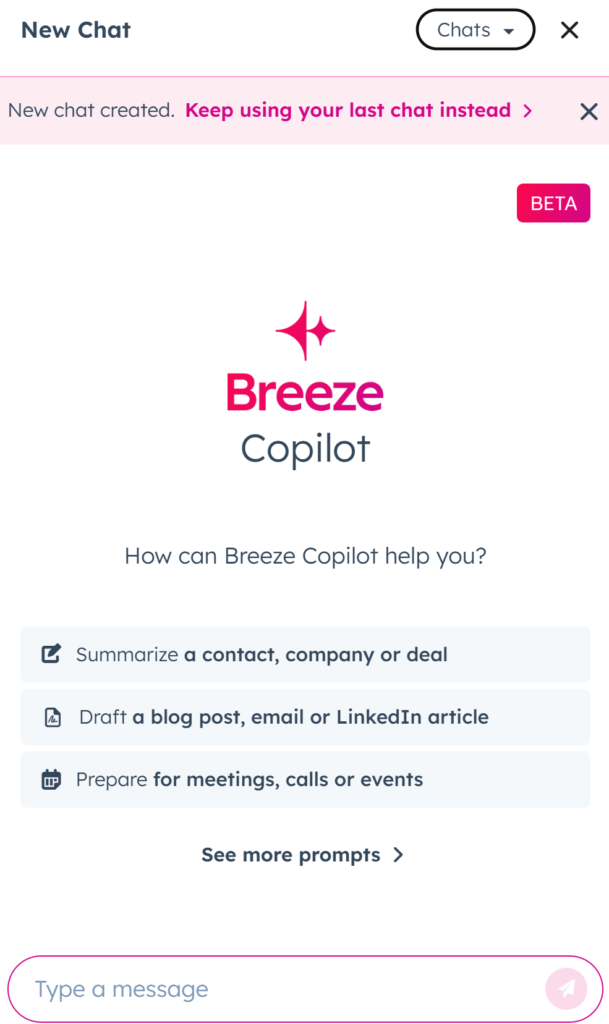
Copilot acts as your AI-powered assistant, helping sales and marketing teams by automating routine tasks such as email drafting, lead scoring, and customer segmentation. It ensures teams focus on high-value activities while maintaining efficiency.

3. Intelligence: AI-Powered Insights for Decision-Making

Intelligence provides predictive analytics and data-driven recommendations, allowing businesses to anticipate customer needs, personalize interactions, and improve decision-making through real-time insights.

How Breeze Helps Businesses

  • Increased Productivity: AI-driven automation reduces manual workload and boosts efficiency.
  • Enhanced Customer Engagement: AI-driven interactions strengthen customer relationships and improve satisfaction.
  • Smarter Decision-Making: Predictive analytics help optimize strategies and drive business growth.
  • Seamless Integration: Works effortlessly within HubSpot’s ecosystem, making AI adoption smooth and scalable.

Real-World Applications

1. For Sales Teams

Sales reps can use Copilot to draft personalized emails, analyze lead behavior, and close deals faster.

2. For Marketing Teams

Marketing teams leverage Intelligence for content recommendations, campaign optimization, and audience targeting.

3. For Customer Support

Agents handle FAQs, schedule meetings, and provide 24/7 support, ensuring better customer satisfaction.


Examples of ready to use prompts Hubspot AI offers you. 

How to Implement Breeze and Start Using It

Getting started with Breeze is simple:

  1. Enable AI in HubSpot: Make sure your HubSpot plan includes AI capabilities.

  2. Activate AI Tools: Configure Copilot, Agents, and Intelligence in your CRM settings.

  3. Customize Workflows: Adapt AI features to your specific business needs.

  4. Train Your Team: Ensure your sales, marketing, and support teams maximize Breeze’s potential.

Want to implement Breeze seamlessly in your business? Let’s optimize your HubSpot CRM together! Contact us for expert consulting and integration.

Do you have any question for us?

We love hearing new challenges, complete the following form and we will answer you in less than 24 hours!